To set up your account, please have your utility bill handy. You will need your account number and a 5-digit pin number located below the billing date (on your bill) to set up your account.
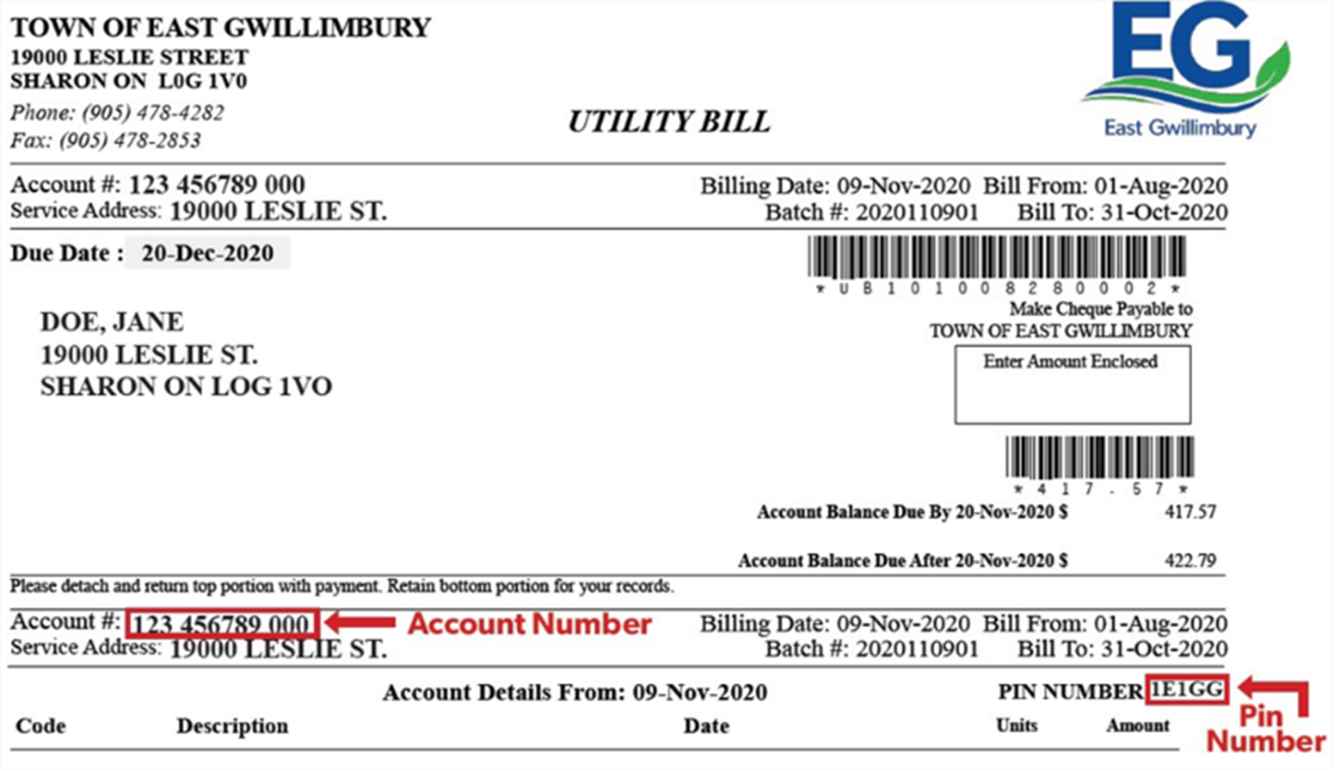
Follow these steps to set up/link your online accounts:
- Visit the Online Portal.
- Select the “Show Me How” button located in the box below the “Login” button.
- Using the drop-down menu, select the account type you’d like to add to your account.
- Fill in the required information from your bill, including your account number or roll and 5-digit pin number. If you’d like to receive bills via email or through the portal, please select the appropriate option and verify your email.
- Once complete, select save.
- The next step will ask you to create a username and password. Type in your username and password and hit save. Please do not use your email address as your username. You will now have access to view your accounts online.
If you have questions or require assistance with setting up your account, please contact Customer Service at customerservice@eastgwillimbury.ca or call 905-478-4282.